








Color on a push button switch is not a styling choice. It is a functional specification — and the two dominant standards that govern it, IEC 60947-5-1 and NEMA ICS 5, do not always agree on what each color means. For manufacturers building equipment for a single market, this is straightforward. For manufacturers exporting to both IEC and NEMA markets — or building panels that must satisfy multiple regional approval bodies simultaneously — the color question becomes a real design problem.
Why Button Color Is Standardized at All
The purpose of color coding on push button switches is operator safety. In a control panel with dozens of buttons, color gives an operator immediate visual information about what a button does before reading any label. In an emergency, or when working in a noisy or distracting environment, this matters.
Both IEC and NEMA color standards are built on the same underlying logic: certain colors carry inherent meaning that operators across different facilities and different employers can rely on. The problem is that the two systems developed independently, and the mapping between color and meaning is not always the same.
IEC 60947-5-1: The International Standard
IEC 60947-5-1 is the governing standard for low-voltage control circuit devices, including push button switches, across most of the world outside North America. It specifies preferred colors for actuators based on their function.
The key color assignments under IEC 60947-5-1:
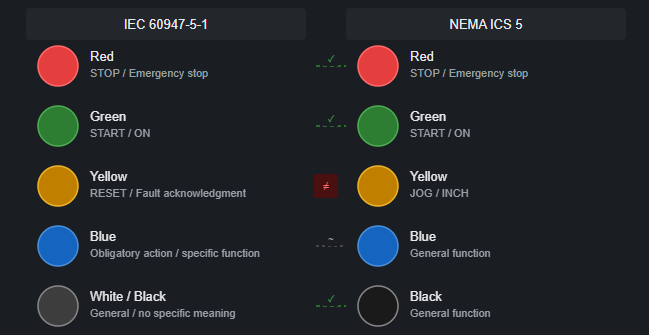
Red is reserved for emergency functions and stopping. A red push button should be used for STOP, EMERGENCY STOP, or any function that removes power or stops machine motion. This is one of the strongest conventions in the standard — red for stopping is nearly universal in IEC-compliant panels worldwide.
Green is the preferred color for START or ON functions. Press a green button: the machine starts, the circuit energizes, something begins. This is the counterpart to red — green starts, red stops.
Yellow is assigned to abnormal condition responses — typically RESET after a fault, or an intervention to clear an alarm or restart after an unexpected stop. It signals that something has gone wrong and the operator is acknowledging it.
Blue is used for functions that are not covered by the other color assignments — often RESET in contexts where yellow is already used for something else, or for special functions defined by the machine designer. IEC describes blue as the color for functions where a specific obligation to act is implied.
White, grey, and black are used for general functions with no specific safety meaning — mode selection, enable, and other functions where none of the above colors apply.
One important rule in IEC 60947-5-1: red must not be used for START or ON functions. This is explicit. A red button that starts a machine is non-compliant with IEC, regardless of what label is printed next to it.
NEMA ICS 5: The North American Standard
NEMA ICS 5 governs industrial control equipment in North America and is the primary standard referenced for UL-listed control panels in the United States and Canada.
NEMA color assignments for push button switches:
Red is for STOP functions. This aligns with IEC — red for stopping is consistent across both standards.
Green is for START functions. Also aligned with IEC.
Yellow in NEMA is assigned to RETURN, INCH, or JOG functions — not to fault reset or abnormal condition response as in IEC. This is the first meaningful divergence: a yellow RESET button compliant with IEC may not carry the same intended meaning in a NEMA context.
Black is used for general functions in NEMA — similar to the IEC use of white, grey, or black for non-specific functions.
Blue in NEMA is also available for general use, similar to IEC.
White is sometimes used for general or dual-function buttons in NEMA panels.
The most significant NEMA-specific rule involves red: NEMA also prohibits red for START, consistent with IEC. This alignment makes both standards compatible on the most safety-critical point.
Where IEC and NEMA Conflict
The practical conflicts between IEC and NEMA color conventions fall into a few specific areas:
Yellow means different things. IEC assigns yellow to abnormal condition acknowledgment — fault reset, restart after unexpected stop. NEMA assigns yellow to JOG or INCH. A panel designed for an IEC market will use a yellow RESET button. The same button in a NEMA context would conventionally be a JOG button. If a machine is exported from one market to another without changing the panel, the color creates ambiguous expectations.
Blue has broader use in IEC. IEC uses blue for a specific category of obligatory action — functions where the operator is required to intervene. NEMA uses blue more generally. This is a softer conflict — both allow blue for non-emergency functions — but the intended meaning in IEC is more precise.
Green illuminated vs. green actuator. In IEC, a green illuminated indicator means the system is safe or ready — no abnormal condition present. A green push button means START. These are different components with the same color, which is consistent within IEC but can create visual confusion on panels where illuminated indicators and actuator buttons are mixed together in close proximity.
Emergency stop color. Both IEC and NEMA require emergency stop actuators to be red, on a yellow background if a background is present. On this point the standards are well aligned, and IEC 60947-5-5 (which specifically governs emergency stop devices) is referenced in both IEC and NEMA contexts for E-stop requirements.
What This Means for Equipment Manufacturers
For a manufacturer building panels entirely for IEC markets — Europe, China, the Middle East, Southeast Asia, and most of the world — IEC 60947-5-1 color conventions apply, and the mapping is clear enough to follow consistently.
For a manufacturer building panels for North American markets only, NEMA ICS 5 applies, and the differences from IEC are limited enough that most panels end up looking similar — red for stop, green for start, the main variation being yellow. The harder case is a manufacturer building a single panel design or a single product family that needs to be certified for and sold into both IEC and NEMA markets. Here, a few practical approaches are common:
Use the IEC conventions throughout. Since IEC and NEMA agree on the most safety-critical assignments — red for stop, green for start, never red for start — an IEC-compliant panel will not violate the core safety intent of NEMA conventions. The yellow divergence is the main gap, and it can often be addressed through clear labeling and documentation rather than a different button color. Avoid yellow entirely on shared designs. If the panel design needs to work in both markets without modification, removing yellow from the palette (substituting white or black for functions that would otherwise be yellow) eliminates the ambiguity. This is a conservative approach but a clean one.
Use labels as the primary identification and color as secondary. In panels with clear text labels on or next to every button, the label carries the functional meaning and the color is a secondary cue. This reduces the impact of color convention differences — an operator who reads the label “RESET” is not relying solely on the yellow color to understand the function. For export equipment, this approach is common and practical. Separate panel versions by market. For higher-volume production where the cost of dual inventory is acceptable, some manufacturers maintain an IEC-configured panel variant and a NEMA-configured variant, with different button colors and potentially different contact ratings. This is the cleanest solution but requires managing two BOMs.
Emergency Stop: Where Both Standards Agree Most
Emergency stop button color requirements are the most consistently enforced across both IEC and NEMA, and the alignment between the two is strongest here.
Both require:
- Red actuator (mushroom head)
- Yellow background or mounting plate where a background is used
- The actuator must be clearly distinguishable from all other push buttons on the panel
IEC 60947-5-5 adds specific requirements for the reset mechanism — if it’s a twist-to-reset type, the direction of unlocking must be clearly marked. Both laser engraving and molded arrows on the actuator face are acceptable methods; ink printing is technically allowed but can wear away over time, which is worth considering for equipment with a long field service life. The consistent E-stop requirements across both standards mean that emergency stop button sourcing is one area where IEC and NEMA market requirements don’t create a dual-inventory problem.
Indicator Lights: A Related but Separate Color System
Push button switch colors and indicator light colors follow related but not identical conventions. It’s worth keeping them separate when designing a panel.
For indicator lights under IEC 60947-5-1:
Red indicates an abnormal or dangerous condition — fault active, pressure exceeded, motor tripped.
Green indicates a normal or ready state — system ready, motor running normally, no faults present.
Yellow indicates a condition that requires attention but is not yet a fault — an approaching limit, a pending maintenance action.
Blue indicates that operator action is required.
White is used for general information — power on, circuit energized — with no specific safety meaning.
Notice that green for an indicator light means “normal/running” — which is consistent with green for a START button (both signal the machine being in active, normal operation). Red for an indicator means “fault/danger” — consistent with red for STOP (both signal a stopping condition or hazard).
This internal consistency in IEC color logic is one of its strengths. The colors are not arbitrary — they map onto a coherent system of safe (green), dangerous or stopping (red), caution or abnormal (yellow), and action required (blue). Understanding the logic makes applying it correctly more intuitive than memorizing rules.
A Practical Color Reference
For panel designers specifying push button switches for IEC markets, the following color assignments cover most standard functions:
START / ON: Green
STOP / OFF: Red
EMERGENCY STOP: Red actuator, yellow background
RESET after fault: Yellow
JOG / INCH: White or black (not yellow — avoid the NEMA conflict)
MODE SELECT (manual/auto, local/remote): White or black
GENERAL FUNCTION (no specific safety meaning): White, grey, or black
For NEMA markets, the same assignments work with one substitution: use yellow for JOG/INCH and use white or black for RESET functions.
For dual-market panels, follow IEC assignments and add clear text labels to every button. Avoid yellow where possible, or use it only where its meaning is unambiguous from the label regardless of color convention.
At ACXION, our push button switches are available in red, green, yellow, blue, and white as standard colors across all head types — momentary, latching, illuminated, and key-operated. For OEM panel manufacturers supplying multiple markets, we can supply the same switch model in different colors within the same production run. If you are specifying button colors for a panel design and want to confirm the right configuration for your target markets, contact us with your function list and we will advise on color assignment.