








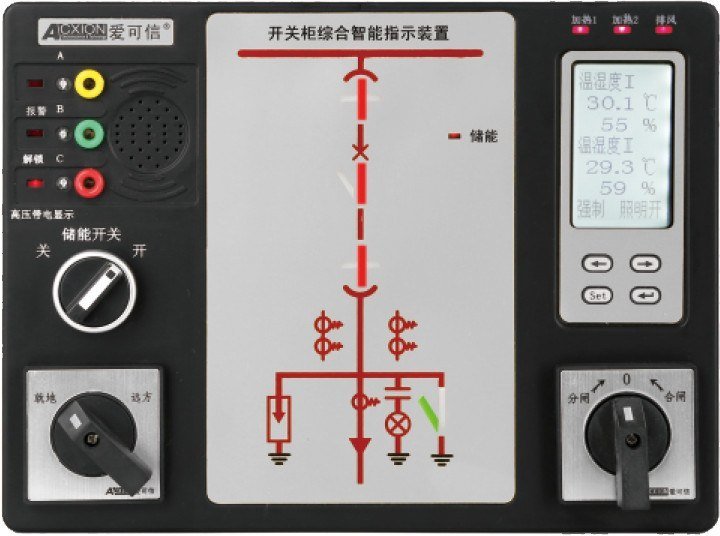
On a switchgear cubicle, the operator standing in front of the door has to answer four questions before touching anything. Is the breaker closed? Is the truck in the service or the test position? Is the spring charged? Is the earthing switch closed, and is the cable still live? Status indication is the device that answers all four at a glance, and on modern panels it is one multifunction unit rather than four separate lamps and a hand-painted mimic.

Scope note: this covers switchgear status indication on metal-clad and ring-main cubicles at medium voltage, using the ACX6100 range as the example. Low-voltage distribution boards with a simple lamp fascia are a smaller version of the same job. ACXION manufactures this range.
What the panel actually reports
The ACX6100 groups the signals by what they tell the operator, and the grouping is worth understanding before the model number means anything.
| Signal group | Typical inputs |
|---|---|
| Status inputs | Truck service and test position, breaker open and closed, spring charged, earthing switch |
| High-voltage inputs | Phase A, B and C live sensor inputs with a common earth |
| Environmental | Temperature and humidity sensor inputs, heater and fan relay outputs |
| Control | Close and open commands, local and remote selection, energy-storage control |
| Kommunikation | RS485 Modbus-RTU |
| Auxiliary | AC/DC supply, protective earth, cabinet lighting output |
Device supply is 80 to 270 V AC/DC with a maximum power draw of 15 W, so the same unit runs from a 110 V DC station battery or a 230 V AC auxiliary supply. Relay contacts are rated 250 VAC / 5 A. Operating range is -5 to 55 degrees C at up to 93% RH non-condensing, which covers an unconditioned switchroom in most climates.
Six variants, arranged by what they add
The variant map is progressive. Each platform keeps the one below it and adds a function group.
| Variant | Base platform | Added functions |
|---|---|---|
| A | Switch-status indicator | Status mimic, optional functions, compact indication |
| B | Non-digital control | Two-channel temperature and humidity control, live indication, control switches |
| C | Digital LED control | LED temperature and humidity display, interlocking |
| D | LCD control | LCD temperature and humidity display, interlocking |
| E | Online temperature | Up to 12 wireless temperature points |
| F | Electrical measurement | Voltage, current, frequency, power factor, power, energy |

The jump that matters commercially is A to B. An A-variant panel tells the operator what the breaker is doing. A B-variant panel also controls the cabinet climate and carries the control switches, which removes a separate heater controller and a set of panel switches from the door. On a cubicle where space on the front plate is tight, that consolidation is usually the reason the ACX6100 was specified at all.
The second jump that matters is E, which accepts up to 12 wireless temperature points through the same face. That is how a cubicle gets joint monitoring without a second display device.
The mimic diagram is a project drawing
This is the part buyers underestimate. The front plate is a project-specific drawing, and the catalogue states plainly that the mimic diagram and switch arrangement must be confirmed with the order.
We had a cubicle come back to us because the mimic drawing showed the draw-out contact on the opposite side from the actual unit. Nothing was electrically wrong. The panel read backwards to anyone who had operated the original, which for a maintenance team is worse than a wrong reading, because it is a wrong reading that looks familiar. The order was eight cubicles, and two units needed a new front plate. The site also paid for a second commissioning visit.
Since then, we ask for a photograph of the existing front plate with the operator’s own pencil marks on it, plus the single-line diagram. Two minutes of the customer’s time, and the drawing arrives correct. Where the panel is a new build rather than a replacement, the mimic layout comes from the switchgear builder’s arrangement drawing, and the earlier in the project that arrives, the better.
Wiring, interference and commissioning
The status inputs are dry contacts and they are forgiving. The live indication inputs are not. The high-voltage sensors on phases A, B and C carry a very small signal, and if that wiring shares a conduit or a cable tray with the control cable that switches a 220 V DC trip coil, the indication can flicker or read live on a dead cable.
Commissioning practice that has worked for us: keep the sensor leads separate from control wiring, use the common earth terminal as the single reference point for all three phases, and test the live indication with a known live source before the cubicle is handed over. Do not commission the interlocking logic from a functional test alone, because interlocking that passes on a bench and fails on site is usually a wiring-separation problem, not a logic problem.
Standard practice for the control switches on the fascia, including the close and open selector, follows IEC 60947-5-1 for control circuit devices and switching elements. The assembly as a whole, including its temperature rise under load, is covered by IEC 61439-1.
When not to specify the measurement variant
The F variant measures voltage, current, frequency, power factor, power and energy. On a cubicle that already has a dedicated panel meter, adding F means a second set of current inputs on the same CTs.
Adding burden to a metering core is a real cost. A CT has a rated burden, and the accuracy class holds only up to that burden. Two devices on one core can push it past the rated value, and the reading error moves without any visible fault. Where both measurements are genuinely needed, use separate cores in the CT, not one core with two loads.
For most cubicles, the practical choice is: F when the panel is the only measuring point, and skip it where a meter is already fitted. The same logic applies to variant E where joint monitoring is already provided by a dedicated receiver.
Specifying one
Send the single-line diagram, the switchgear arrangement drawing, the status list you want on the fascia, the supply available in the cubicle, and the communication requirement. The status list is the document that decides the variant, and it is worth writing it in the operator’s words first and then mapping each item to an input.
The variant map, terminal groups and technical envelope are in the power monitoring and protection catalogue on our Download-Center. The individual lamps and illuminated indicators that go alongside a fascia are in the Kontrollleuchten category, and the switch side of the same panel is covered in our notes on Fehlerbehebung am Bedienfeld. Our manufacturing background is on Über ACXION, and mimic drawings go through the Kontaktseite.
Terminal numbering and front-plate layout differ by variant and by project. Commission only against the wiring drawing supplied with the device.
These panels are built to the project drawing and quoted per configuration, so there is no single part number to order from. Send the status list and the arrangement drawing and we will work it up.
Ein Kommentar
Die Kommentare sind geschlossen.
[…] on our download centre. Where the panel face needs status indication as well, our notes on switchgear status indication panels cover that choice. Cabinet climate control is a separate problem, described in our article on […]