








Three weeks after a new packaging line went live, the maintenance log started repeating itself. Line stopped. Cause unknown. Restarted. No fault code, no damage, nothing reproducible on the bench.
It was the operator’s shoulder. Reaching across the panel to free a jammed bag, her sleeve caught the raised head of a start button at the edge of the cutout. Three nuisance stops a week, and nobody had costed them.
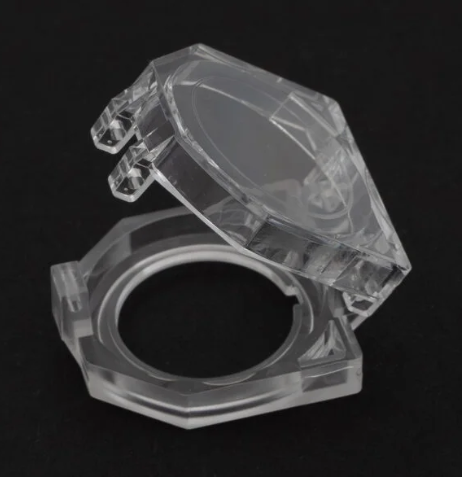
A transparent push button protective cover, hinged, over that one head cost under two dollars. Cheap, unglamorous, and in the right panel position the difference between a machine that runs and one that keeps stopping.
What a push button protective cover actually does
It is a mechanical interface between the outside world and an actuator — nothing more. It does not change the switch’s electrical characteristics, improve the contact rating, or turn a cheap switch into a good one. What it does is narrow the ways a button can be operated.
Blocks unintended contact. Sleeves, tool handles, product falling off a conveyor, a pallet corner, someone leaning on the enclosure. A guard pulls the actuation surface inward so a glancing contact stops doing anything.
Raises the effort required. A determined operator will still press it. Someone brushing past will not. That is the realistic target — not security, just a threshold.
Keeps debris and moisture off the actuator. The actuator has to move, so it has to have a gap, so it has a path for dust, swarf and washdown water. A gasketed cover closes that path better than the switch’s own seal manages alone.
If you wanted a fourth job — stopping an authorised operator from pressing the button — you want a key selector switch or a padlockable device, not a plastic cover. Guards engineered to be hard to remove mostly get removed, usually with a screwdriver that scratches the panel on the way.
Where uncovered buttons actually fail
Four positions account for most of it.
Edge-of-panel buttons. Anything within about 150 mm of the enclosure edge gets bumped. Layout software decides side clearance, and layout software does not model a human hip.
Buttons below waist height. Reaching over them is normal. So is the tool in your hand dragging across them on the way back out.
Buttons beside a door or swing panel. A door opening 110 degrees and stopping against the enclosure wall is a lever aimed at whatever sits underneath.
Reset and start buttons in high-traffic areas. People stand there and lean there. Nuisance stops cluster here.
The switch was almost always fine. The position was the problem, and a push button protective cover is the fastest way to buy it back.
Five guard families, and where each one belongs
| Guard type | Best for | Watch out for |
|---|---|---|
| Flat head cover, opaque | Buttons that must not be pressed casually | Hides the lens, so an illuminated head becomes useless |
| Fully transparent flat head cover | Illuminated buttons, reset, alarm acknowledge | Cheap acrylic hazes within a year in abrasive dust |
| Emergency stop protective cover | Mushroom heads in impact zones | Must never require a lift before actuation |
| Ø40 e-stop cover with warning plate | Where the marking has to travel with the guard | Plate text is fixed at tooling — plan languages up front |
| Rotary switch protective cover | Selector knobs knocked out of position | Check detent force; a stiff cover feels like a false position |
Two of these deserve a paragraph.
The opaque flat head cover is the cheapest guard we make and the one most often bought by mistake — ordered for an illuminated button, fitted, and then found to hide the lamp that was meant to be read from the walkway. If there is a lens underneath, order transparent.
The rotary switch protective cover solves a different problem. A selector knocked from AUTO to MANUAL is not a nuisance stop; it is an unexpected start condition, and it belongs in a risk assessment. If a latching selector sits in a high-traffic position and its status is not monitored in the PLC, that is a gap worth closing.
Sizing a push button protective cover the first time
| Mounting hole | Common head diameter | Clearance to plan for |
|---|---|---|
| Φ22 mm | 29–30 mm flat or raised head | 45 mm centre-to-centre minimum |
| Φ22 mm | 40 mm mushroom head | 55 mm centre-to-centre minimum |
| Φ30 mm | 38–40 mm head | 60 mm centre-to-centre minimum |
| Φ22 mm with 45° selector knob | Knob sweep around 50 mm | 65 mm, plus hand space |
- Measure the head, not the hole. The cutout is Φ22 almost everywhere, but the head above it runs from a 24 mm flat disc to a 60 mm mushroom. The guard matches the head.
- Leave room for travel. A raised head moves 4–6 mm. A guard sitting flush at rest will wear through or jam within a few thousand cycles.
- Think about the hinge, not the footprint. A right-hinged cover on a button operated by a left hand gets “fixed” by being left permanently open.
That is why a protective cover for 22mm push button devices is the most common size in the catalogue: standard cutouts mean standard heads, and standard heads mean one guard family covers most of a fleet.
Transparent or opaque? Read the walkway
A 24 V LED indicator module is readable through a 2 mm polycarbonate window from six or seven metres in normal factory lighting. The same lamp behind a scratched acrylic window at 500 lux is a smudge.
- Polycarbonate is the sensible default. It resists impact, does not shatter into shards, and holds clarity under abuse.
- Acrylic (PMMA) looks better new and hazes faster. Fine indoors, a poor choice near abrasive dust or aggressive solvents.
- UV exposure yellows both. On an outdoor enclosure, treat the cover as a wear item with a part number.
- Cleaning chemistry matters. The alkaline foam cleaners used in food plants will cloud an uncoated window, so specify cover and switch together if the panel is washed down daily.
The emergency stop question
An e-stop has one job: to be operable immediately, by anyone, without thought. Anything that inserts a step in front of that — a lift-flap, a hinged lid raised first, a cover that must be unscrewed — works against the design intent. A guard that has to be opened before the mushroom head can be pressed is a modification of the safety function, and in most risk assessments it will fail.
Acceptable e-stop guards work differently. They protect the head from impact while leaving the top face directly accessible to a palm strike, they prevent accidental release or reset on pull-to-reset designs, and they carry the marking so the yellow disc stays with the device through a repaint.
If operators keep hitting the e-stop by accident, the better answers are usually layout (move it), geometry (recessed or shroud-mounted), or logic. Fold that decision into your review of the IEC 60947-5-5 requirements for emergency stop devices, because the standard’s language on direct manual actuation is what an auditor will quote back at you.
One exception worth naming: on pull-to-reset and rotary-reset heads, a cover that prevents accidental re-arming is genuinely useful, because reset is a deliberate act by a competent person rather than an emergency action.
Matching the guard to the head you already have
- Illuminated reset button, Φ22. A fully transparent flat head push button switch protective cover keeps the lamp readable and the head protected.
- Non-illuminated start/stop pair. An opaque flat head push button switch protective cover is enough, and it is the cheapest option on the BOM.
- Mushroom head in materials handling. An emergency stop button protective cover in collar form keeps a pallet corner from firing the stop while leaving the top face open.
- Marking that keeps disappearing. A Ø40 emergency stop button protective cover with warning plate merges guard and label into one part, and the Φ40 head version does the same where the head exceeds the standard cutout.
- Selector knobs on pump and fan panels. A rotary switch protective cover stops the knob being knocked out of detent between rounds.
- A finding that repeats every audit. Pair the guards with an emergency stop button sign so the device carries its own required marking.
A switch guard and a sign are low-value, low-weight parts, so they almost never justify their own shipping line — add them to a switch order instead.
A six-point spec checklist
- Head diameter and travel, measured on a real sample rather than taken from a drawing.
- Actuation force through the cover. If it adds more than roughly 2 N, operators start pressing off-centre and actuator life drops.
- Hinge orientation, matched to the hand that operates the button.
- Lamp legibility at the real viewing distance. Walk the walkway in the actual lighting.
- IP rating and gasket material. IP65 is the normal target; the gasket should be EPDM or silicone, not a foam that crumbles in three years. If the switch is rated for washdown, match the discipline described in our notes on what CE, UL and IP65 mean for a waterproof push button switch.
- Availability of the identical cover in five years. Standardise on one cover family, not one cover per machine.
Retrofitting is straightforward on a Φ22 panel. Check two things first: depth behind the panel, because some designs push the switch back slightly, and paint condition, because collars fitted to a freshly repainted panel can lift the finish.
Frequently asked questions
Will a push button protective cover stop an operator from pressing the button?
No, and it should not try to. A cover makes accidental contact unlikely and deliberate contact deliberate. To prevent operation by a person, use a key-operated selector switch, a padlockable device, or a controlled access procedure.
Do I need a cover on every button?
No. Cover the four positions described earlier — panel edges, below waist height, beside swinging doors, and high-traffic start/reset positions. Covering the whole panel wastes money and slows routine operation.
Can a push button protective cover be fitted over an illuminated head?
Yes, with a transparent window. Choose polycarbonate over acrylic and verify the lamp is readable from the operating position before ordering for a whole fleet.