








The inspector spent eleven minutes in a fourteen-door control room and never opened an enclosure. He walked the line with a red pen, looked at the front of each panel, and wrote down four findings. Three of them were about labels.
I was there because the customer had asked us to look at a switch that was “sticking”. It wasn’t sticking. What was actually wrong was that nobody could tell which button did what, because the factory had wiped the panel down with solvent for three years and the printed labels had gone the way of everything else that meets solvent.
The maintenance manager was not pleased to learn that his audit finding had cost a day of downtime, three hours of our time, and a week of relabelling. He was less pleased when I told him the fix was about two dollars of hardware per device, and that the version he needed had been in our catalogue since before he joined the company. Panel marking is the least glamorous line on a control panel BOM. It is also the line that shows up most often in audit findings, and the one that fails first in service.
What the inspector was actually looking for
The marking clause of IEC 60204-1 exists so that a person who has never seen your machine can operate it, isolate it and troubleshoot it without asking anyone. An auditor checks four things:
- Can every operator device be identified? Not “probably identifiable if you know the machine”. Identified, from the operating position.
- Is the emergency stop identifiable as an emergency stop? Including its marking, colour and background.
- Are the supply and isolation points identified? Main isolator, incoming supply, any second source.
- Is the marking still legible today? This is the one that catches people. Design intent does not survive an audit; the physical label does.
Findings cluster in the fourth item. Panels pass an audit in year one, when everything is crisp. They fail in year three, after the washdowns, the solvent wipes, the UV, and the two buttons that were swapped during a breakdown and never relabelled.
Why a nameplate frame outlives a printed label
Four mechanisms kill marking. Adhesive migration lifts label edges first, then lets dust and cleaning fluid underneath until the whole thing peels. Solvent and alkaline attack removes the ink that the panel cleaner was never designed to protect. UV fade takes the colour first and the contrast second, so a red warning label turns pink and stops being compliant. Mechanical loss takes anything placed next to a glove or on a moving part.
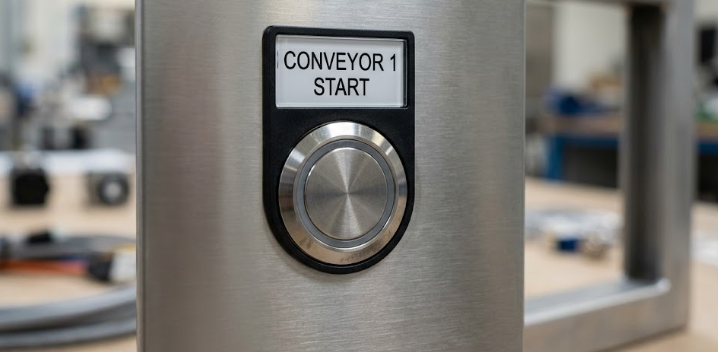
A nameplate frame sidesteps three of those four at once. The text sits behind a window rather than on the surface, so gloves, wipes and swarf touch the frame instead of the ink, and the only consumable is the insert.
There is a fifth failure mode that is purely organisational, and it is the one auditors care about most: the label was correct when it was installed and nobody has checked it since. Machines get modified, buttons get reassigned, and in most plants the panel marking and the actual function diverge somewhere in year two without anyone noticing.
Character height is a calculation, not an opinion
Legibility is geometry. The working rule of thumb in control panel practice is a character height of roughly 1/200 of the viewing distance under normal factory lighting, with a margin on top for safety-related text.
| Viewing distance | Minimum cap height | Reasonable design value |
|---|---|---|
| 0.5 m | 2.5 mm | 3 mm |
| 1 m | 5 mm | 5–6 mm |
| 2 m | 10 mm | 10–12 mm |
| 3 m | 15 mm | 15–18 mm |
| 5 m | 25 mm | 25 mm plus |
Two consequences fall out of that table.
First, most panels are marked for a viewing distance nobody uses. Text sized for somebody standing at the panel with a clipboard is unreadable from the walkway where operators actually stand. Measure where the operator stands and size from there.
Second, frame size is dictated by character height, not the other way round. A small nameplate frame for push button switches holds a compact insert, which suits single words like START and STOP or a lone symbol. The moment you need a phrase — “CONVEYOR 3 RUN”, “ISOLATE BEFORE MAINTENANCE” — you are into a large nameplate frame for push button switches, because the text has to fit at the height the distance demands. Ordering frames before working out the text is how panels end up marked legibly but wrongly, or correctly but unreadably.
Three marking materials, honestly compared
| Method | Service life | Chemical resistance | Cost | Change control |
|---|---|---|---|---|
| Printed insert behind a frame window | Long — text is protected | Good; replace the insert, keep the frame | Low, repeat cost is pennies | Excellent; reprint one insert |
| Anodised aluminium, laser marked | Very long | Very good | Moderate | Poor; a change means a new plate |
| Laminated engraving stock (two-layer) | Very long | Excellent | Highest | Poor to moderate |
| Printed polyester or vinyl label | 1–3 years typical | Poor to moderate | Lowest | Easy, and that is its only advantage |
The pattern is consistent: the cheapest label is the one you will replace three times, and it is the only one that lets a maintenance technician print a replacement from the office. That trade is sometimes right — just make it deliberately.
For most industrial panels the sensible default is a frame with a printed insert. The frame becomes permanent panel hardware, and the insert is a consumable that gets reprinted whenever the text changes. That is what a frame for push button switches is for: not decoration, but the mechanism that turns control panel labelling from a rework job into a printing job.

The emergency stop sign is a separate device, and it should be
An auditor looking at an e-stop checks three things: that the actuator is identifiable as an emergency stop, that the marking is durable, and that the colour and background arrangement matches the standard the panel is built to. That last one differs between regions — our notes on IEC versus NEMA push button switch colour standards cover where the conventions diverge.
The practical failure is always the same. The e-stop is marked with an adhesive label that wears off, fades, or gets peeled during a repaint, and the device ends up functionally correct and visually anonymous. Panel doors get repainted far more often than anyone plans for. The fix is physical rather than procedural: use a dedicated emergency stop button sign that mounts as hardware rather than as a label, so no wipe, solvent or spray gun removes it. Pair it with a guard that carries its own marking where the e-stop sits in an impact zone.
One point that surprises people: on a pull-to-reset or twist-to-release mushroom head, the reset state deserves marking as much as the stop state. Operators need to know which direction re-arms the machine before they touch it.
Alignment: why some panels look homemade
This is cosmetic until it isn’t. A row of nameplate frames sitting at three different heights, each rotated a few degrees off its neighbour, reads as a panel assembled in a hurry — and customers buying a machine notice, because the panel is the first thing they see.
Positioning rings sit between the switch bezel and the panel and set a consistent face height, so a row of devices finishes flush and level rather than with one bezel proud and the next recessed. A row of positioning rings for push button switches does more for apparent build quality than any other change at the same price.
Anti-rotation rings stop the device body turning when an operator applies torque to a selector or key switch. Without one, a selector that gets turned firmly drifts out of alignment over a few months, the legend rotates with it, and the panel is wrong for the rest of its life. Both the round corner and square corner versions are sized for standard cutouts, and they are the cheapest insurance on the panel.
The reason these matter comes back to the cutout. Nearly every panel in the world uses the same Φ22 hole, which is why the 22mm push button switch dominates industrial control panels — and why a standard hole in an imperfectly punched panel will happily accept a device that sits a degree or two off true. The ring corrects what the punch got wrong.
A marking schedule you can hand to the panel shop
One table, one row per device. This is what turns panel marking from a discussion into a deliverable.
| Column | What goes in it |
|---|---|
| Device reference | The designator from the schematic, e.g. SB1, SA1 |
| Device function | Plain description, e.g. “conveyor 3 start” |
| Marking text | Exactly as it should appear, in caps, line breaks shown |
| Marking language | List every market the machine ships to |
| Symbol required | Standard symbol reference, or “none” |
| Frame size | Small, large or sign — driven by the character-height table |
| Marking colour | Text and background, matched to the function convention |
| Material | Insert, engraved or anodised |
Two habits make the schedule worth the effort. Write the text in caps and count characters before ordering nameplate frames, because a 24-character phrase does not fit where a 6-character one does. And include the language column even for domestic machines, because equipment gets resold and the second owner’s market is not the one you designed for.
Frequently asked questions
How long should panel marking last?
Match it to the machine’s expected service life, not the cheapest option. A nameplate frame with a printed insert, or an engraved plate, will outlast the switch behind it. Adhesive labels are a consumable with a replacement interval — and most plants that use them never define one.
Is a nameplate frame required, or can I mark the panel directly?
Direct marking works and is done in some sectors. It has one serious drawback: when a device is reassigned, the marking is wrong forever. A frame keeps the marking changeable while protecting the text.
Do I need marking on every single device?
Every device an operator or maintainer has to interact with, yes. Indicator lamps that only repeat information available elsewhere are the usual exception. When in doubt, ask whether someone unfamiliar with the machine could work out what to do without asking. If not, mark it.